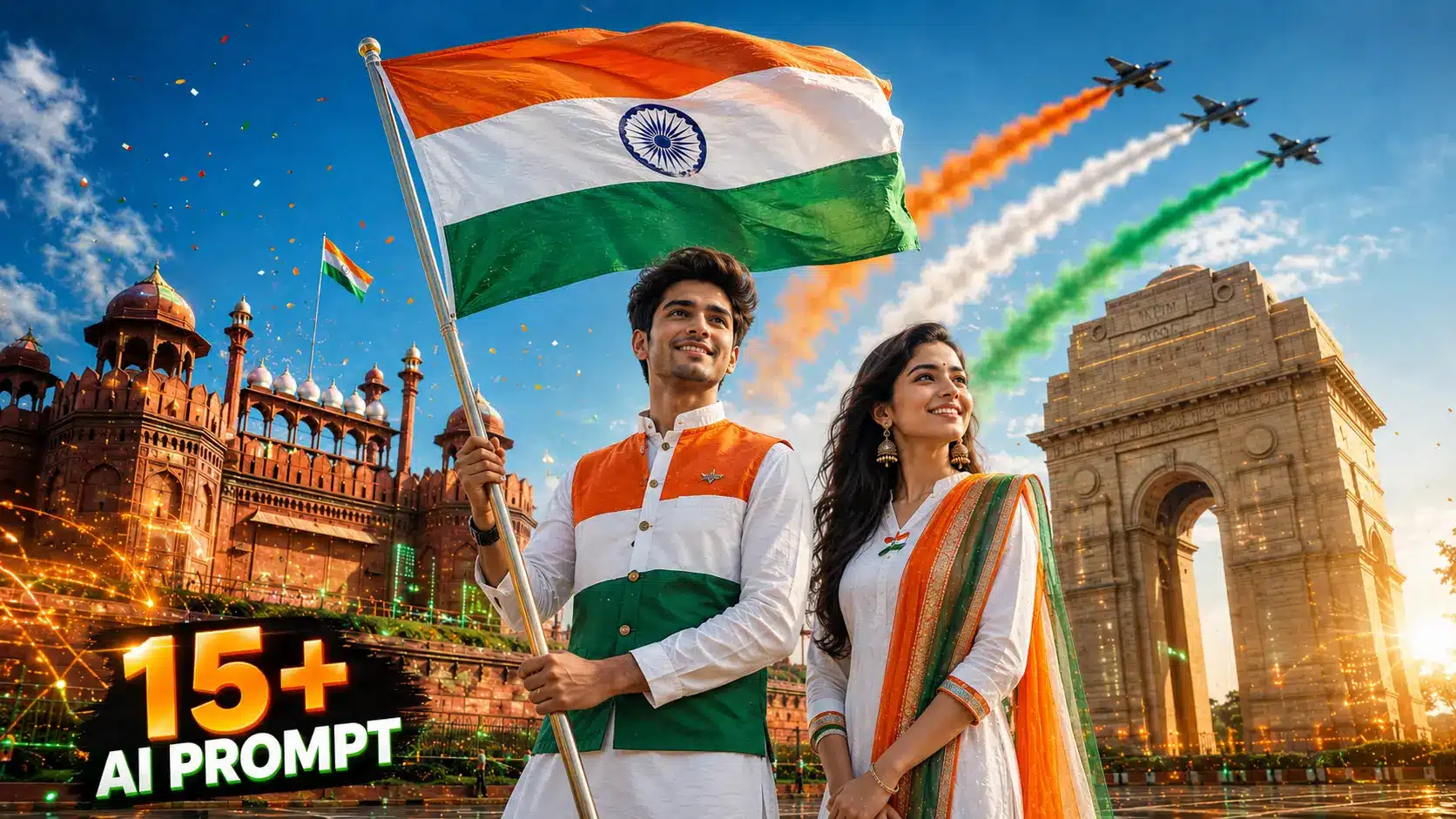
अगर आप भी 2026 में जानना चाहते हैं कि AI se independence day poster kaise banaye, तो आप बिल्कुल सही जगह पर आए हैं। 15 अगस्त (स्वतंत्रता दिवस) के मौके पर सोशल मीडिया जैसे WhatsApp, Instagram और Facebook पर अपने नाम और तिरंगे वाले 3D AI पोस्टर्स शेयर करने का ज़बरदस्त ट्रेंड चल रहा है।
पहले ऐसा अट्रैक्टिव पोस्टर बनवाने के लिए फोटोशॉप और ग्राफिक डिज़ाइनर की ज़रूरत होती थी, लेकिन अब आप केवल 1 मिनट में बिना किसी डिज़ाइनिंग स्किल के मुफ़्त में शानदार 3D पोस्टर तैयार कर सकते हैं।
अगर आप मेरे सभी पोस्ट पढ़ते होंगे, तब आपको मालूम होगा कि मैं हमेशा आसान और 100% काम करने वाले तरीके ही आपके साथ साझा करता हूँ। इस विस्तृत गाइड में हम स्टेप-बाय-स्टेप सीखेंगे कि Bing Image Creator (Microsoft Designer) और AI टूल्स का इस्तेमाल करके अपने नाम और फोटो वाला 15 अगस्त का पोस्टर कैसे बनाएं। साथ ही, नीचे आपको 16+ ट्रेंडिंग कॉपी-पेस्ट AI प्रॉम्प्ट्स (Prompts) की पूरी लिस्ट मिलेगी जिसे आप सीधे 1-क्लिक में इस्तेमाल कर सकते हैं।
📌 आप इस लेख से क्या सीखेंगे (Quick Overview)
- Best AI Poster Tools: Bing Image Creator, ChatGPT DALL-E 3, Midjourney और Canva AI का फ्री उपयोग।
- 16+ Categorized Trending Prompts: लड़कों, लड़कियों, कपल्स, बच्चों, विंग्स स्टाइल, देशभक्ति सोल्जर और ऑफिशियल विशिंग पोस्टर्स।
- Name & Face Swap Integration: पोस्टर में अपना नाम और असली चेहरा (Selfie) जोड़ने का आसान तरीका।
- HD Download & Sharing: 4K रेजोल्यूशन में पोस्टर डाउनलोड करके WhatsApp व Instagram स्टेटस पर लगाना।
🚀 Real Impact: इस गाइड की मदद से आप 60 सेकंड के अंदर अपने और अपने दोस्तों व परिवार के लिए बेहद खूबसूरत, पर्सनलाइज्ड और देशभक्ति से भरपूर 15 अगस्त पोस्टर बना पाएंगे।
AI Se Independence Day Poster Kaise Banaye – Best AI Tools Comparison –
यदि आप सोच रहे हैं कि AI se independence day poster kaise banaye के लिए सबसे अच्छा टूल कौन सा है, तो नीचे दी गई तालिका में बेस्ट AI इमेज जनरेटर टूल्स की पूरी तुलना देखें:
| AI टूल का नाम (Tool Name) | कीमत (Pricing) | 3D टेक्स्ट/नाम क्वालिटी | इस्तेमाल में आसानी | बेस्ट किसके लिए है |
|---|---|---|---|---|
| Bing Image Creator (Designer) | 100% Free (Daily 15 Boosts) | ⭐⭐⭐⭐⭐ (बेहतरीन) | बहुत आसान | 3D नाम और तिरंगा फोटो |
| ChatGPT (DALL-E 3) | Free / Plus ($20) | ⭐⭐⭐⭐☆ (उत्कृष्ट) | सरल चैट इंटरफेस | सिनेमैटिक आर्ट और विशेज |
| Canva Magic Studio | Free / Pro | ⭐⭐⭐⭐☆ (अच्छा) | ड्रैग एंड ड्रॉप | स्कूल/ऑफिस बैनर पोस्टर |
| Flux.1 / Midjourney | Freemium / Paid | ⭐⭐⭐⭐⭐ (अल्ट्रा 8K) | मीडियम | प्रोफेशनल हाई-डिटेल आर्ट |
Bing Image Creator से 15 August AI Poster कैसे बनाएं (Step-by-Step Guide) –
Bing Image Creator (अब Microsoft Designer) OpenAI के DALL-E 3 मॉडल पर काम करता है और यह बिल्कुल मुफ़्त है। नीचे दिए गए 5 सरल स्टेप्स को फॉलो करें:
- स्टेप 1 (वेबसाइट खोलें): अपने मोबाइल या कंप्यूटर के ब्राउज़र में Bing Image Creator (Designer) की आधिकारिक वेबसाइट पर जाएं।
- स्टेप 2 (साइन-इन करें): अपने Microsoft Account (Outlook या Hotmail) से लॉगिन करें।
- स्टेप 3 (प्रॉम्प्ट पेस्ट करें): नीचे दिए गए हमारे 16+ प्रॉम्प्ट्स में से अपनी पसंद का प्रॉम्प्ट कॉपी करें और टेक्स्ट बॉक्स में पेस्ट करें।
- स्टेप 4 (नाम बदलें): प्रॉम्प्ट के अंदर जहाँ
YOUR NAMEलिखा है, उसे हटाकर अपना असली नाम लिख दें। - स्टेप 5 (Create पर क्लिक करें): ‘Create’ बटन दबाएं। मात्र 10 से 15 सेकंड में AI आपके लिए 4 अलग-अलग 3D पोस्टर्स जनरेट कर देगा।
1. AI Se Independence Day Poster Kaise Banaye for Boys (4 Prompts) –
लड़कों के लिए कुर्ता, जैकेट, हुडी और बाइक थीम वाले 4 रियलिस्टिक 3D प्रॉम्प्ट्स:
प्रॉम्प्ट 1: Traditional White Kurta with Nehru Jacket & Flag –
A realistic 20-year-old Indian handsome boy joyfully celebrating Indian Independence Day. He is wearing a stylish white traditional kurta-pajama with a tricolor Nehru jacket. The name "YOUR NAME" is clearly and boldly printed on the front of his jacket. He is proudly waving a large Indian National Flag in his hand. Background shows the Red Fort (Lal Qila) with colorful balloons in saffron, white, and green in the sky, 3D hyper-realistic 8k render, cinematic lighting.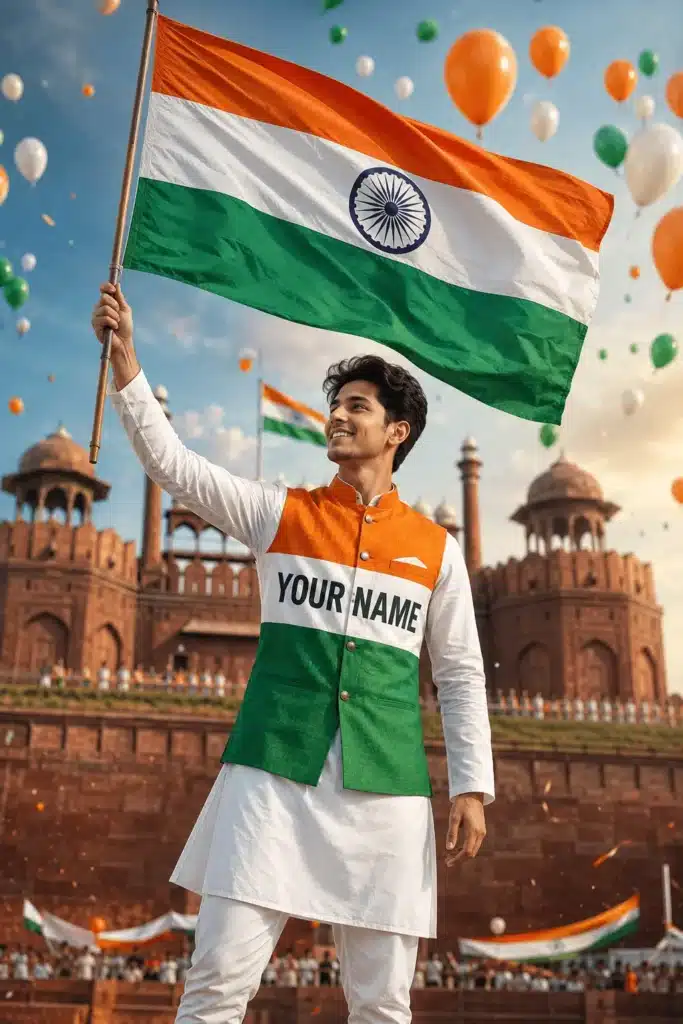
प्रॉम्प्ट 2: Casual Hoodie & Sunglasses 3D Bench Style –
A 3D realistic illustration of a young Indian boy sitting relaxed on a modern bench. He is wearing a tricolor hoodie with shades of saffron, white, and dark green, with the name "YOUR NAME" stylishly written on the chest. He is wearing black sunglasses and holding a small Indian flag. The background has a soft bokeh effect with glowing Ashoka Chakra and tricolor smoke, ultra-detailed 4k wallpaper.प्रॉम्प्ट 3: Bullet / Royal Enfield Bike with Indian Flag –
A 3D realistic young Indian boy sitting on a classic Royal Enfield Bullet motorcycle. The bike is decorated with mini Indian flags. He is wearing a stylish white denim jacket with "YOUR NAME" printed in saffron on the back. The background shows India Gate surrounded by flying tricolor kites and soft golden morning sunlight, hyper-realistic, 8k.प्रॉम्प्ट 4: 3D Animated Pixar Style Boy with Big Flag –
Cute 3D animated character of an 18-year-old Indian boy with messy hair, wearing a white oversized t-shirt with "YOUR NAME" written in 3D metallic tricolor font. He is holding a large fluttering Indian flag on his shoulder with a confident smile. Pixar-style smooth lighting, vibrant saffron and green background bokeh, 4k.2. 15 August AI Prompts for Girls (लड़कियों के लिए 4 Prompts) –
लड़कियों के लिए अनारकली सूट, साड़ी, मॉडर्न वेस्टर्न और क्यूट 3D स्टाइल के 4 प्रॉम्प्ट्स:
प्रॉम्प्ट 5: Elegant White Anarkali with Tricolor Dupatta –
A hyper-realistic 3D portrait of a graceful 20-year-old Indian girl celebrating Indian Independence Day. She is wearing a gorgeous white Anarkali suit with a tricolor dupatta (saffron, white, green) elegantly draped over her shoulder. The name "YOUR NAME" is written in elegant gold lettering on her dress. She is holding a waving Indian flag with a happy smile. The background has tricolor kites flying in the sky, soft sunlight, highly detailed 8k photography.प्रॉम्प्ट 6: Traditional Tricolor Border Saree Portrait –
A beautiful 3D realistic portrait of a young Indian woman wearing a pure white silk saree with rich saffron and green border work. The name "YOUR NAME" is embroidered in gold on the pallu. She has her hands folded in a polite "Namaste" pose with an Indian flag pin on her chest. Background shows historical Indian monuments with festive tricolor lighting, ultra-HD.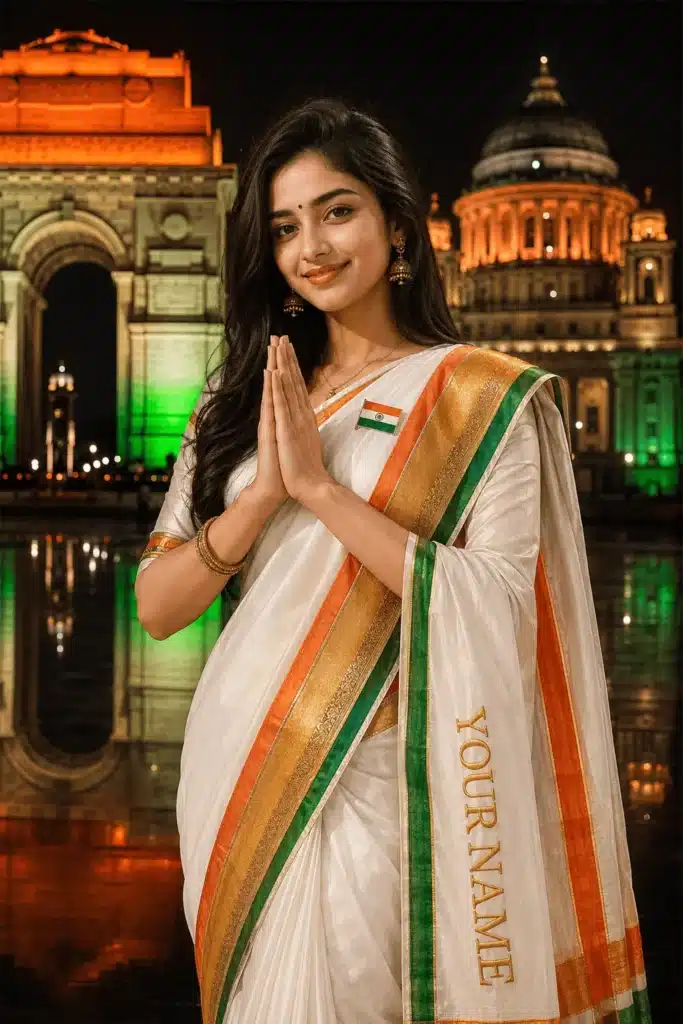
प्रॉम्प्ट 7: Cute Pixar 3D Animated Girl with Balloons –
A cute and charming 3D Disney-Pixar style animated Indian girl standing in front of India Gate. She is wearing a tricolor t-shirt with "YOUR NAME" boldly printed in 3D typography. She is holding a bunch of saffron, white, and green balloons. In the sky, fighter jets are leaving a tricolor smoke trail, joyful festive atmosphere, vibrant colors, 4k render.प्रॉम्प्ट 8: Modern Denim Jacket & Sunglasses Girl –
A stylish 3D modern Indian girl wearing sunglasses and a white crop top with "YOUR NAME" in tricolor font, layered with a denim jacket. She has tricolor face paint on her cheek and is waving a mini Indian flag. Red Fort background with festival confetti in the air, cinematic golden hour lighting, 8k.📱 Recommended Digital Wellbeing App: 15 अगस्त और त्योहारों के समय हम अक्सर रील्स और सोशल मीडिया पर जरूरत से ज्यादा स्क्रॉल करने लगते हैं जिससे हमारा जरूरी काम छूट जाता है। अपनी इस आदत को सुधारने के लिए BrainPex App ज़रूर आज़माएँ। यह GlyIQ Labs का logic-powered ऐप है जो Focus Battles, Smart App Blocking और Live Analytics के साथ आपकी doomscrolling की लत को आसानी से छुड़ाता है। अधिक जानकारी के लिए हमारा BrainPex App Review भी पढ़ सकते हैं।
3. Couple और Glowing Wings 3D Prompts (4 Prompts) –
कपल और एंजेल विंग्स थीम वाले 4 सुपर-ट्रेंडिंग प्रॉम्प्ट्स:
प्रॉम्प्ट 9: Romantic Couple Celebrating Independence Day –
A realistic 3D romantic portrait of a young Indian couple celebrating Indian Independence Day. The boy is wearing a white kurta with "BOY NAME" written on it, and the girl is wearing a white kurti with a tricolor dupatta with "GIRL NAME" written in gold font. They are both holding one Indian flag together with pride and smiling at the camera. Beautiful backdrop of Red Fort with tricolor confetti in the air, cinematic lighting, 8k resolution.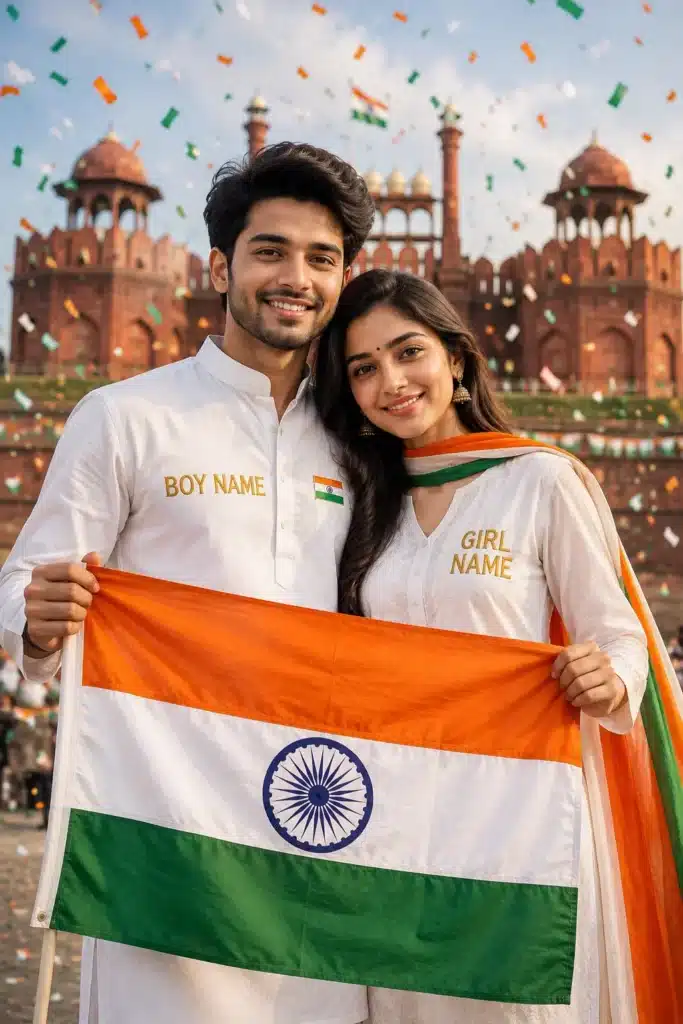
प्रॉम्प्ट 10: Cute Animated 3D Couple at India Gate –
3D Pixar style animated Indian couple sitting together on a scooter decorated with small Indian flags. The boy shirt says "BOY NAME" and girl top says "GIRL NAME". Background shows India Gate with tricolor fireworks in the evening sky, romantic patriotic vibe, 4k.प्रॉम्प्ट 11: Glowing Neon Tricolor Wings Fantasy Poster –
A striking 3D conceptual portrait of a young Indian person standing confidently with massive glowing angel wings colored in the Indian Tricolor (Saffron on top, White in middle, Green at bottom). Above them, glowing neon 3D text displays "YOUR NAME" and "Happy Independence Day 2026". Dark dramatic background with glowing Ashoka Chakra radiating blue light, hyper-realistic fantasy art, 8k.प्रॉम्प्ट 12: 3D Royal Throne with Giant Flag Wings –
A young Indian boy sitting like a king on a majestic golden throne. Behind the throne, gigantic wings made of pure fluttering Indian flags are spread wide. The wall behind displays a huge glowing neon sign of "YOUR NAME". Dark moody background with golden dust particles, cinematic ultra-detailed 8k render.4. Army Tribute, DP और Official Wishing Banners (4 Prompts) –
सेना सम्मान, सोशल मीडिया डीपी और कॉर्पोरेट शुभकामना पोस्टर्स के लिए 4 बेहतरीन प्रॉम्प्ट्स:
प्रॉम्प्ट 13: Indian Army Soldier Himalayan Flag Tribute –
A cinematic and emotional Indian Independence Day tribute poster. An Indian Army soldier in uniform saluting the grand Indian Flag fluttering at high altitude in the Himalayas. In the sky, transparent silhouette of national heroes and glowing Ashoka Chakra. Bold typography at bottom reads: "Happy Independence Day - Saluting the Bravehearts" with "Presented by YOUR NAME", ultra-realistic, moody cinematic lighting, 8k.प्रॉम्प्ट 14: Social Media Profile Avatar / Circular DP Style –
A modern circular 3D profile picture (DP) for WhatsApp and Instagram. A stylish young Indian face with tricolor cheek paint, wearing white attire with "YOUR NAME" written below. Circular glowing border with Indian tricolor gradient and subtle Ashoka Chakra in background, clean aesthetic, 4k vector render.प्रॉम्प्ट 15: Corporate & School Official Wishing Banner –
A professional, clean, and elegant Indian Independence Day greeting poster design. Minimalist tricolor fluid brush strokes on a premium textured white background. A sharp golden Ashoka Chakra in the center with typography "79th Happy Independence Day 2026". At the bottom, a stylish placeholder card with "Warm Wishes from: YOUR NAME / COMPANY NAME", high-end corporate vector style render.प्रॉम्प्ट 16: 3D Metallic Typography & Tiranga Splash –
Bold 3D metallic typography of "YOUR NAME" in large reflective chrome letters with tricolor reflections. Surrounding the text are dynamic splashes of saffron and green liquid colors, with an Indian flag waving dynamically in the backdrop. Studio lighting, black reflective floor, ultra-high resolution 8k wallpaper.AI Poster में अपना असली चेहरा कैसे लगाएं (AI Face Swap Guide) –
अगर आप चाहते हैं कि AI द्वारा बनाए गए 3D कैरेक्टर पर आपका 100% असली चेहरा दिखे, तो आप Remaker AI या Face Swapper का फ्री में इस्तेमाल कर सकते हैं:
- सबसे पहले Bing Image Creator से ऊपर दिए गए 16 प्रॉम्प्ट्स में से अपनी मनपसंद 3D इमेज डाउनलोड करें।
- अब गूगल पर Remaker AI Face Swap वेबसाइट खोलें।
- ‘Original Image’ वाले बॉक्स में अपनी AI-जनरेटेड तिरंगा फोटो अपलोड करें।
- ‘Target Face’ वाले बॉक्स में अपनी खुद की असली साफ़ सेल्फी (Selfie) अपलोड करें।
- ‘Swap Face’ पर क्लिक करें। मात्र 5 सेकंड में AI आपके चेहरे को उस पोस्टर पर बिल्कुल नैचुरली सेट कर देगा!
यदि आप दूसरे डिज़ाइनिंग टूल्स के बारे में जानना चाहते हैं, तो हमारा 15 August Wishing Poster Kaise Banaye का विस्तृत ट्यूटोरियल भी देख सकते हैं।
5 Pro Tips: 15 August AI Poster को और अधिक आकर्षक बनाने के नियम –
- 1. प्रॉम्प्ट में सही कीवर्ड्स जोड़ें: ‘Hyper-realistic 8k’, ‘Cinematic lighting’, ‘3D render’, और ‘Octane render’ जैसे शब्द जोड़ने से फोटो की क्वालिटी 10 गुना बढ़ जाती है।
- 2. नाम को कैपिटल लेटर्स में लिखें: प्रॉम्प्ट में अपना नाम हमेशा ‘YOUR NAME’ (कोटेशन मार्क्स में) लिखें ताकि AI स्पेलिंग की गलती न करे।
- 3. तिरंगे के रंगों का सही क्रम लिखें: प्रॉम्प्ट में हमेशा ‘Saffron, White, and Green with Ashoka Chakra’ स्पष्ट रूप से लिखें।
- 4. Canva में टेक्स्ट फाइन-ट्यून करें: अगर आप शायरी या कोई खास शुभकामना संदेश जोड़ना चाहते हैं, तो इमेज डाउनलोड करने के बाद Canva App में खोलकर हिंदी फोंट्स जोड़ सकते हैं।
- 5. बूस्ट क्रेडिट्स खत्म होने पर चिंता न करें: Bing Image Creator में दैनिक 15 बूस्ट खत्म होने के बाद भी इमेजेस बनती रहती हैं, बस 5-10 सेकंड अतिरिक्त समय लगता है।
क्या AI से Independence Day पोस्टर बनाना बिल्कुल फ्री है?
हाँ, Bing Image Creator (Microsoft Designer) और ChatGPT के जरिए 15 अगस्त के 3D पोस्टर्स बनाना 100% मुफ़्त है। इसके लिए आपको कोई सब्सक्रिप्शन लेने की ज़रूरत नहीं है।
AI Poster में अपना नाम कैसे जोड़ें?
Bing Image Creator में प्रॉम्प्ट पेस्ट करते समय जहाँ ‘YOUR NAME’ लिखा है, उसे हटाकर अपना असली नाम लिख दें। AI आपके नाम को कुर्ते, जैकेट या बैकग्राउंड में 3D स्टाइल में प्रिंट कर देगा।
Bing Image Creator से पोस्टर डाउनलोड कैसे करें?
जब AI इमेज जनरेट कर दे, तो अपनी पसंदीदा फोटो पर टैप करें। स्क्रीन पर नीचे दाईं ओर ‘Download’ बटन दिखाई देगा, उस पर क्लिक करके आप फुल HD में फोटो सेव कर सकते हैं।
क्या मोबाइल फोन से 15 August AI Poster बनाया जा सकता है?
हाँ, आप अपने स्मार्टफोन के किसी भी ब्राउज़र में bing.com/images/create खोलकर या Microsoft Copilot App डाउनलोड करके मोबाइल से आसानी से पोस्टर बना सकते हैं।
AI फोटो में अपना खुद का असली चेहरा कैसे लगाएं?
AI फोटो बनने के बाद Remaker AI Face Swap वेबसाइट पर जाएं। वहाँ AI फोटो और अपनी एक साफ़ सेल्फी अपलोड करें। AI 5 सेकंड में आपका असली चेहरा उस पोस्टर पर जोड़ देगा।
अगर AI नाम की स्पेलिंग गलत लिखे तो क्या करें?
अगर AI नाम गलत लिखता है, तो प्रॉम्प्ट में नाम को कैपिटल लेटर्स में डबल कोट्स (जैसे “RAHUL”) में लिखें और दोबारा ‘Create’ पर क्लिक करें। 2-3 बार में AI सही स्पेलिंग लिख देता है।
लड़कियों के लिए 15 अगस्त का AI पोस्टर कैसे बनाएं?
लड़कियों के लिए हमारे लेख में दिए गए ‘Prompts for Girls’ (जैसे White Anarkali with Tricolor Dupatta या Saree Theme) वाले प्रॉम्प्ट्स को कॉपी करके Bing Creator में पेस्ट करें।
क्या इन AI पोस्टर्स को WhatsApp और Instagram पर शेयर कर सकते हैं?
हाँ, ये पोस्टर्स उच्च क्वालिटी 4K में डाउनलोड होते हैं जिन्हें आप WhatsApp DP, Status, Instagram Post, Stories या Facebook पर आसानी से शेयर कर सकते हैं।
कपल (Couple) के लिए 15 August AI Poster का प्रॉम्प्ट क्या है?
कपल पोस्टर के लिए हमारे आर्टिकल का प्रॉम्प्ट नंबर 9 और 10 इस्तेमाल करें, जिसमें ‘BOY NAME’ और ‘GIRL NAME’ दोनों के नाम डालकर खूबसूरत 3D तिरंगा पोस्टर बनाया जा सकता है।
15 August पोस्टर बनाने के लिए सबसे अच्छा AI टूल कौन सा है?
Bing Image Creator (Microsoft Designer) सबसे बेस्ट टूल है क्योंकि यह मुफ़्त है, 3D टेक्स्ट बहुत साफ़ लिखता है और DALL-E 3 मॉडल की मदद से सबसे रियलिस्टिक फोटो बनाता है।
Conclusion – AI se independence day poster kaise banaye
15 अगस्त स्वतंत्रता दिवस हमारे देश का सबसे बड़ा और गौरवशाली राष्ट्रीय पर्व है। आज की आधुनिक AI तकनीक ने हमारे लिए देशभक्ति की भावना को और भी रचनात्मक व सुंदर तरीके से व्यक्त करना बेहद आसान बना दिया है।
ऊपर दिए गए 16+ ट्रेंडिंग प्रॉम्प्ट्स में से अपने पसंदीदा प्रॉम्प्ट को चुनें, अपना नाम डालें और कुछ ही सेकंड्स में अपना शानदार 3D स्वतंत्रता दिवस पोस्टर तैयार करें।
उम्मीद है कि आपको यह विस्तृत गाइड AI se independence day poster kaise banaye बहुत पसंद आई होगी। अगर आपको पोस्टर बनाने में कोई भी दिक्कत आ रही है, तो नीचे कमेंट बॉक्स में अपना नाम और सवाल लिखें, मैं आपकी मदद करूँगा। इस पोस्ट को अपने दोस्तों और परिवार के साथ शेयर करना न भूलें। आप सभी को स्वतंत्रता दिवस की हार्दिक शुभकामनाएं!